
Introduction to PSL — Getting Started Examples
The PSL development editor is the application for creating, running and maintaining PSL projects.
The workspace
The editor uses a multiple document interface (MDI), so you can work on several PSL projects at once. Each project opens in its own window, or view, inside the main application window. Click a view to switch to it. Menus and toolbars live on the main window rather than on each view.
Load the examples
The best place to start is the built-in examples.
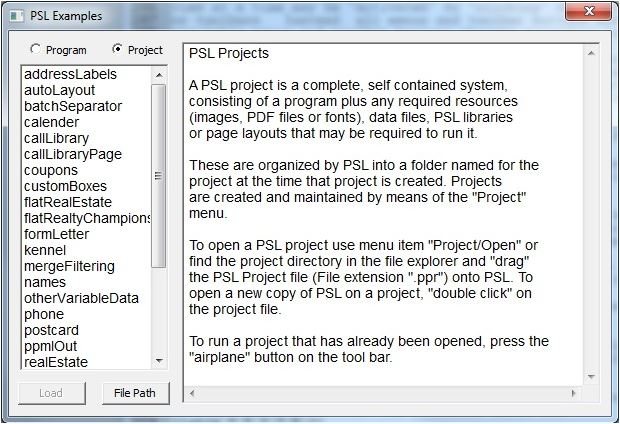
- Open Help › Examples.
- Click File Path and choose where the examples should go. PSL creates an
Examplessubfolder there. - Choose between Project and Program examples. Each has a description.
Run an example
- Project examples: load the project and click the airplane button (run project) on the toolbar.
- Program examples: they open in a view window. Click the red R button to run.
Before any serious PSL work, read at least the first three PSL primers. They cover the fundamentals of every PSL application.
More PSL Page Builder guides
- Why Choose Jetletter PSL Page BuilderThe complete feature guide, from drag-and-drop to transactional work.
- PSL Page Builder VDP Software InstallationInstall, activate and get running in a few minutes.
- .PJB File Automation from the Command LineRun any project from PowerShell or SQL, with nobody at the keyboard.
- Address Box vs Formatted Text BoxWhen to trade automatic USPS formatting for flexibility.
- Speed, Speed and Now Supersonic Speed with Multi-Core ProcessingRecords per minute in the hundreds of thousands.
- Using Excel Files as a Data SourceThe undocumented [sheet$] trick for ODBC merges.