
Address Box vs Formatted Text Box
PSL Page Builder's Address Box applies USPS formatting requirements to every address automatically, including placing the Intelligent Mail barcode correctly. It also verifies the number of characters in the barcode field.
That validation is usually what you want. But sometimes you need to show field names or other data in the barcode position, such as a proof with the header row as the first record. If that's a common need, use a Formatted Text Box instead.
Setting up the Formatted Text Box
- Place a Formatted Text Box where the address block goes.
- Add your address fields and the
[imbarcode]field. - Apply the USPS IMb barcode font to the
[imbarcode]field.
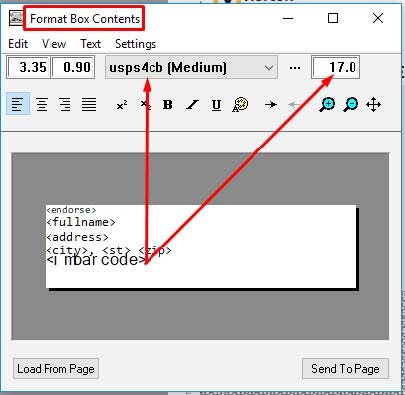
The Formatted Text Box doesn't check the barcode's character count the way the Address Box does. That removes the errors when you output field names or other non-barcode data in that field.
Which to use
| Use the Address Box when | Use a Formatted Text Box when |
|---|---|
| Producing live mail | Outputting proofs with field names |
| You want automatic USPS formatting | You need full control of the layout |
| You want barcode validation | Barcode data may be missing or placeholder text |
More PSL Page Builder guides
- Why Choose Jetletter PSL Page BuilderThe complete feature guide, from drag-and-drop to transactional work.
- PSL Page Builder VDP Software InstallationInstall, activate and get running in a few minutes.
- .PJB File Automation from the Command LineRun any project from PowerShell or SQL, with nobody at the keyboard.
- Introduction to PSL — Getting Started ExamplesLoad and run the built-in examples before your first project.
- Speed, Speed and Now Supersonic Speed with Multi-Core ProcessingRecords per minute in the hundreds of thousands.
- Using Excel Files as a Data SourceThe undocumented [sheet$] trick for ODBC merges.