
How to Output the Header Row (.csv vs .csn)
How do you output the header row of the database into the art? The question comes up often. Usually the first record in a PDF proof needs to show where every variable field is placed, so the client can approve it or your team can check it.
.csv versus .csn
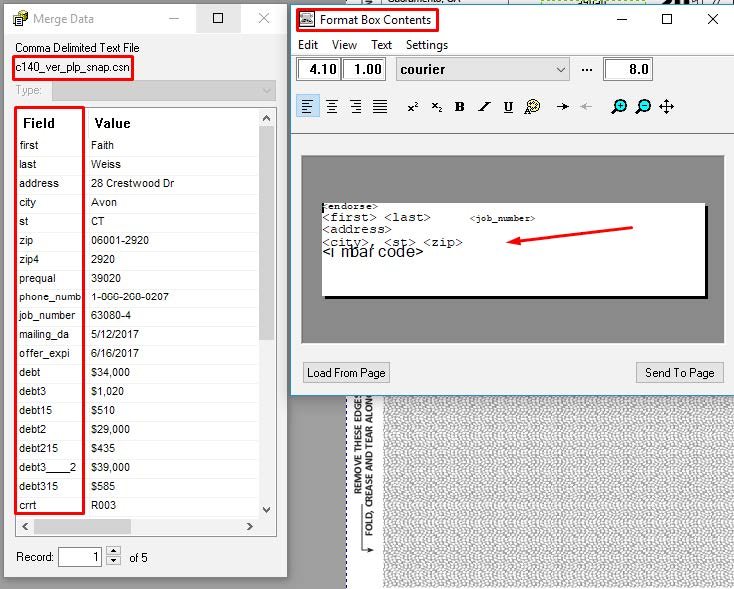
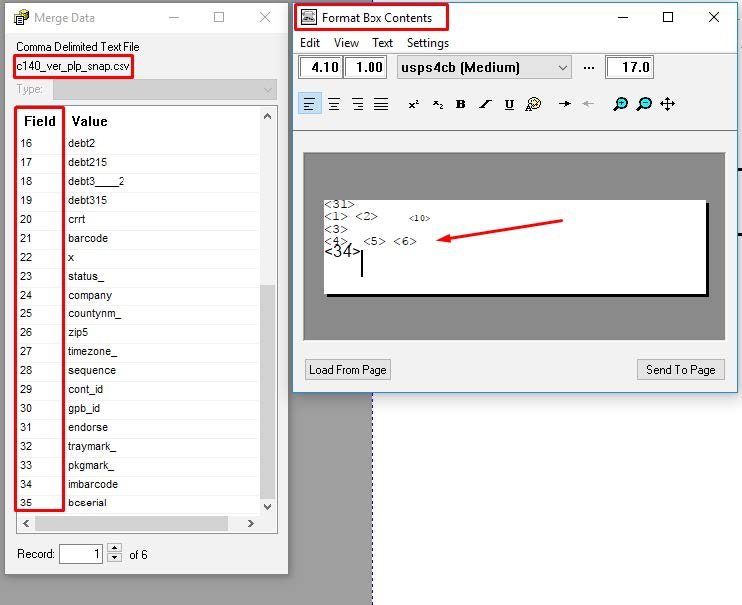
A common method is to use the database with the .csv extension and let the first row output be the header row. When you use a .csv file, the field names come over as the first row of data.
Many of us instead rename the file with a .csn extension. The "n" tells PSL Page Builder to use the first row as the field names, which makes fields much easier to identify and map into your art.
Watch for IMb barcode errors
If you output the header row as data with a .csv file and you're using an Address Box, you may get an error on the IMb barcode field. The barcode can't convert the text [imbbarcode] when it's expecting something like TFADATFFADATDDATATTATTDTDTD.
If that happens, use a Formatted Text Box instead. See Address Box vs Formatted Text Box.
Ways to add a header row and automate it
- Copy the header row as the first data row manually
- Build a PSL routine that modifies the database for you
- Copy the header row with a PowerShell command
- Copy the header row with a small C++ executable
- Copy the header row with an Excel macro
- Use a .csv file so the header becomes the first row
- Connect PSL Page Builder to Access or SQL Server and let macros or stored procedures add the row
- Add the header row as an option in an AccuZIP hot folder
- Make the PowerShell or C++ step part of your PSL Page Builder automation
If you haven't learned the PSL language yet, we recommend getting comfortable with PowerShell. It's a powerful companion to PSL Page Builder for hands-free automation.
More PSL Page Builder guides
- Why Choose Jetletter PSL Page BuilderThe complete feature guide, from drag-and-drop to transactional work.
- PSL Page Builder VDP Software InstallationInstall, activate and get running in a few minutes.
- .PJB File Automation from the Command LineRun any project from PowerShell or SQL, with nobody at the keyboard.
- Introduction to PSL — Getting Started ExamplesLoad and run the built-in examples before your first project.
- Address Box vs Formatted Text BoxWhen to trade automatic USPS formatting for flexibility.
- Speed, Speed and Now Supersonic Speed with Multi-Core ProcessingRecords per minute in the hundreds of thousands.